FCP Backdater - Fix Red Error Screens
What is FCP Backdater? 🚀
FCP Backdater is a desktop app for Mac that quickly and easily fixes red error screens in Final Cut Pro caused by incompatible plugins.
Many Final Cut Pro editors are using older Macs that cannot be updated to the newest versions of MacOS, preventing them from updating Final Cut Pro.
Instead of updating your entire system, FCP Backdater allows you to convert Motion templates, effects, transitions, titles, and generators to match your version of Final Cut Pro – in just one click.

⚠️
Why Am I Seeing The Red Error Screen?
🚨 The main cause of the red error screen is using a Final Cut Pro version older than the Apple Motion version that the plugin was created in.
Common Reasons You Can’t Update Final Cut Pro:
- 💻 Your Mac doesn’t support newer macOS versions, preventing FCP updates.
- 🎬 You want to keep an older FCP version to avoid breaking existing projects.
- 🏢 You’re using FCP on a company or university computer with update restrictions.
- 👍 You prefer the version of Final Cut Pro you currently have.
- 🖥️ Other software you use is only compatible with an older macOS version.
Instead of upgrading your system, use FCP Backdater to make your plugins work with your current setup.
Why Use FCP Backdater?
- ✅ Fixes Final Cut Pro plugin errors
- ✅ Works with titles, effects, transitions & generators
- ✅ One-click backdating with drag-and-drop simplicity
- ✅ Batch backdate multiple plugins to save time
- ✅ No annoying limits – backdate as many plugins as you want
How It Works
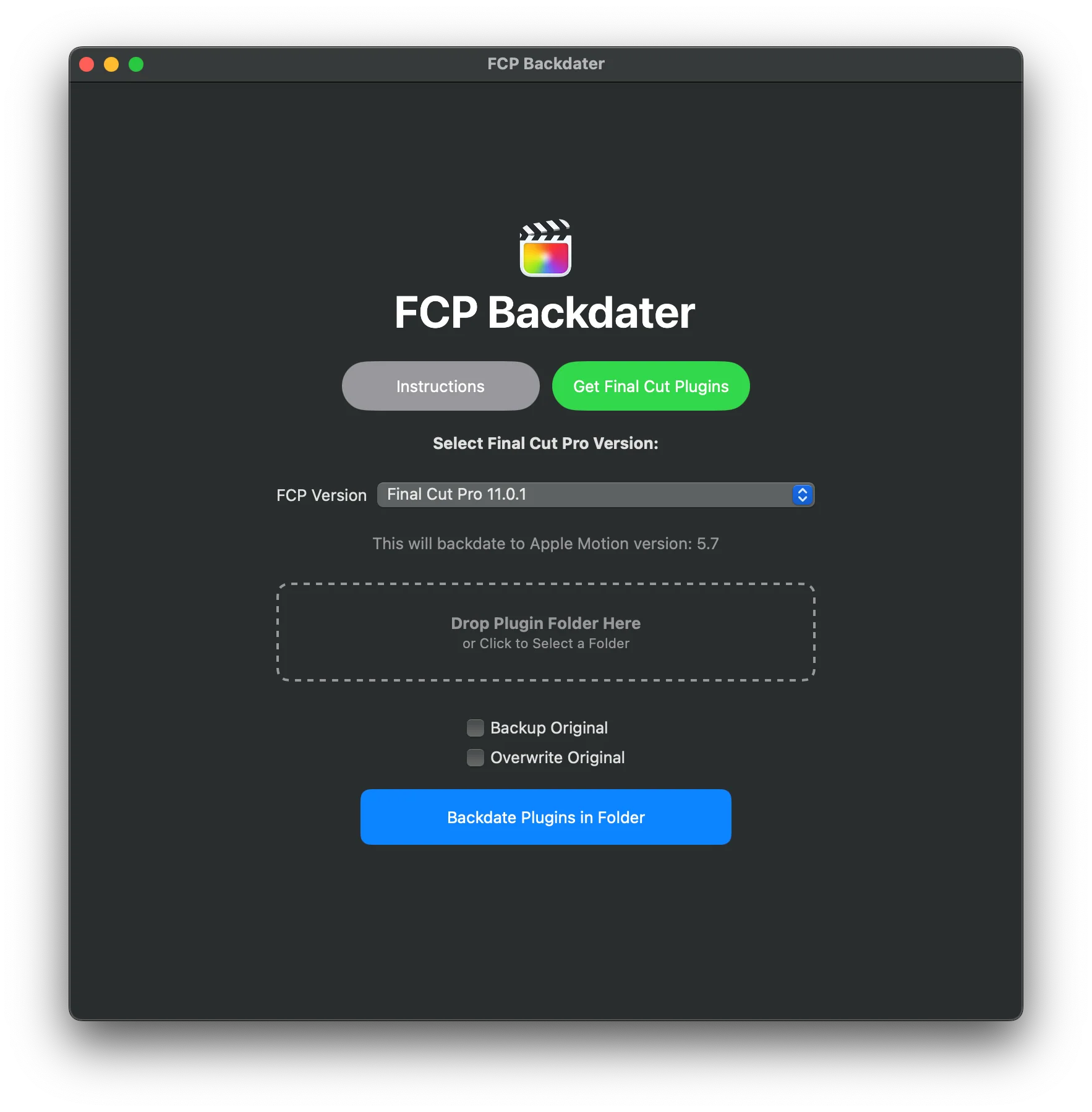
- 📂 Drag and drop your incompatible plugin into the app.
- 🛠 Select your Final Cut Pro version.
- 🎬 Click "Backdate" and let the app do its magic.
- ✅ Open your backdated plugin in Final Cut Pro – error-free!
System Requirements
- 💻 macOS 11 (Big Sur) or later
- 🎬 Final Cut Pro 10.0 - 11.0
- 📂 Apple Motion templates only (not FxPlug-based plugins)
- 🖥️ At least 500MB free disk space
Copyright
© All Rights Reserved FCPX Full Access
This digital product is protected by DMCA copyright protection.
Strictly not for sharing or resale.
Thank you for supporting an independent business by purchasing from the original developer.
Get FCP Backdater Now
Fix Final Cut Pro plugin errors and unlock your Motion templates today!
Original: $15.00
-65%$15.00
$5.25More Images
FCP Backdater - Fix Red Error Screens
What is FCP Backdater? 🚀
FCP Backdater is a desktop app for Mac that quickly and easily fixes red error screens in Final Cut Pro caused by incompatible plugins.
Many Final Cut Pro editors are using older Macs that cannot be updated to the newest versions of MacOS, preventing them from updating Final Cut Pro.
Instead of updating your entire system, FCP Backdater allows you to convert Motion templates, effects, transitions, titles, and generators to match your version of Final Cut Pro – in just one click.
⚠️
Why Am I Seeing The Red Error Screen?
🚨 The main cause of the red error screen is using a Final Cut Pro version older than the Apple Motion version that the plugin was created in.
Common Reasons You Can’t Update Final Cut Pro:
- 💻 Your Mac doesn’t support newer macOS versions, preventing FCP updates.
- 🎬 You want to keep an older FCP version to avoid breaking existing projects.
- 🏢 You’re using FCP on a company or university computer with update restrictions.
- 👍 You prefer the version of Final Cut Pro you currently have.
- 🖥️ Other software you use is only compatible with an older macOS version.
Instead of upgrading your system, use FCP Backdater to make your plugins work with your current setup.
Why Use FCP Backdater?
- ✅ Fixes Final Cut Pro plugin errors
- ✅ Works with titles, effects, transitions & generators
- ✅ One-click backdating with drag-and-drop simplicity
- ✅ Batch backdate multiple plugins to save time
- ✅ No annoying limits – backdate as many plugins as you want
How It Works
- 📂 Drag and drop your incompatible plugin into the app.
- 🛠 Select your Final Cut Pro version.
- 🎬 Click "Backdate" and let the app do its magic.
- ✅ Open your backdated plugin in Final Cut Pro – error-free!
System Requirements
- 💻 macOS 11 (Big Sur) or later
- 🎬 Final Cut Pro 10.0 - 11.0
- 📂 Apple Motion templates only (not FxPlug-based plugins)
- 🖥️ At least 500MB free disk space
Copyright
© All Rights Reserved FCPX Full Access
This digital product is protected by DMCA copyright protection.
Strictly not for sharing or resale.
Thank you for supporting an independent business by purchasing from the original developer.
Get FCP Backdater Now
Fix Final Cut Pro plugin errors and unlock your Motion templates today!
Product Information
Product Information
Shipping & Returns
Shipping & Returns
Description
What is FCP Backdater? 🚀
FCP Backdater is a desktop app for Mac that quickly and easily fixes red error screens in Final Cut Pro caused by incompatible plugins.
Many Final Cut Pro editors are using older Macs that cannot be updated to the newest versions of MacOS, preventing them from updating Final Cut Pro.
Instead of updating your entire system, FCP Backdater allows you to convert Motion templates, effects, transitions, titles, and generators to match your version of Final Cut Pro – in just one click.
⚠️
Why Am I Seeing The Red Error Screen?
🚨 The main cause of the red error screen is using a Final Cut Pro version older than the Apple Motion version that the plugin was created in.
Common Reasons You Can’t Update Final Cut Pro:
- 💻 Your Mac doesn’t support newer macOS versions, preventing FCP updates.
- 🎬 You want to keep an older FCP version to avoid breaking existing projects.
- 🏢 You’re using FCP on a company or university computer with update restrictions.
- 👍 You prefer the version of Final Cut Pro you currently have.
- 🖥️ Other software you use is only compatible with an older macOS version.
Instead of upgrading your system, use FCP Backdater to make your plugins work with your current setup.
Why Use FCP Backdater?
- ✅ Fixes Final Cut Pro plugin errors
- ✅ Works with titles, effects, transitions & generators
- ✅ One-click backdating with drag-and-drop simplicity
- ✅ Batch backdate multiple plugins to save time
- ✅ No annoying limits – backdate as many plugins as you want
How It Works
- 📂 Drag and drop your incompatible plugin into the app.
- 🛠 Select your Final Cut Pro version.
- 🎬 Click "Backdate" and let the app do its magic.
- ✅ Open your backdated plugin in Final Cut Pro – error-free!
System Requirements
- 💻 macOS 11 (Big Sur) or later
- 🎬 Final Cut Pro 10.0 - 11.0
- 📂 Apple Motion templates only (not FxPlug-based plugins)
- 🖥️ At least 500MB free disk space
Copyright
© All Rights Reserved FCPX Full Access
This digital product is protected by DMCA copyright protection.
Strictly not for sharing or resale.
Thank you for supporting an independent business by purchasing from the original developer.
Get FCP Backdater Now
Fix Final Cut Pro plugin errors and unlock your Motion templates today!